
Learn your part.
Lead the room.
Slow any song down without changing the key. Move it to a key that fits your voice. Loop the hard bar until it's yours, and hear your part up front while everyone else sits back.
For iPhone, iPad, Mac and Android. Made for choir members, singers, keyboardists, guitarists, bassists, drummers, directors and producers.


Practice smarter. Sound ready.
Any tempo, any key
Slow a song to 50% and the key stays put. Move it up or down twelve half steps and the tempo stays put.
Your part up front
Every part on its own fader. One tap brings your part forward: soprano, alto, tenor, bass, or the band alone.
Loop it till it's yours
Loop a line, a section or eight bars. The speed trainer adds 5% each time round until you're at full speed.
Chords over the words
The chord chart sits right where each change lands, spelled for the key you're in, with keyboard, guitar and bass shapes.
Lead from the Live screen
Big lyrics and chords on a dark stage, section pads, a vamp counter, and cues like Vamp, Build and Out.
The whole room follows
Share your Live screen with a four-digit code. Every phone, iPad and computer in the room moves with you.
Sing it back
Sing your part and see your notes against it: on the note, sharp or flat, ahead or behind, line by line.
Lyrics written for you
The app listens to the voices with the band left out and writes the words, each one timed to the music.
All your devices in step
Pair your phone, iPad and computer once. Songs, edits and set lists stay in sync, over Wi-Fi or iCloud.
Add from a link
Paste a Dropbox, Google Drive or iCloud Drive link, or a link to an MP3 or WAV. On a Mac, YouTube links work too.
Chords as numbers
Switch the chart to Nashville numbers, so the band reads 1, 4, 5 in any key you call.
Fits your screen
Phones, foldables, iPads and Macs each get a layout made for their size, from pocket to stage monitor.
Hear it slower. Sing it higher.
Change the tempo and the key separately, and every chord respells the way a chart in that key would read: Bb in F, never A#.
- Tempo from 50% to 150%, key from −12 to +12
- Count-in and a metronome that follow the song's real beat
- One-tap mixes: your part up front, band only, voices only


See every change as it comes.
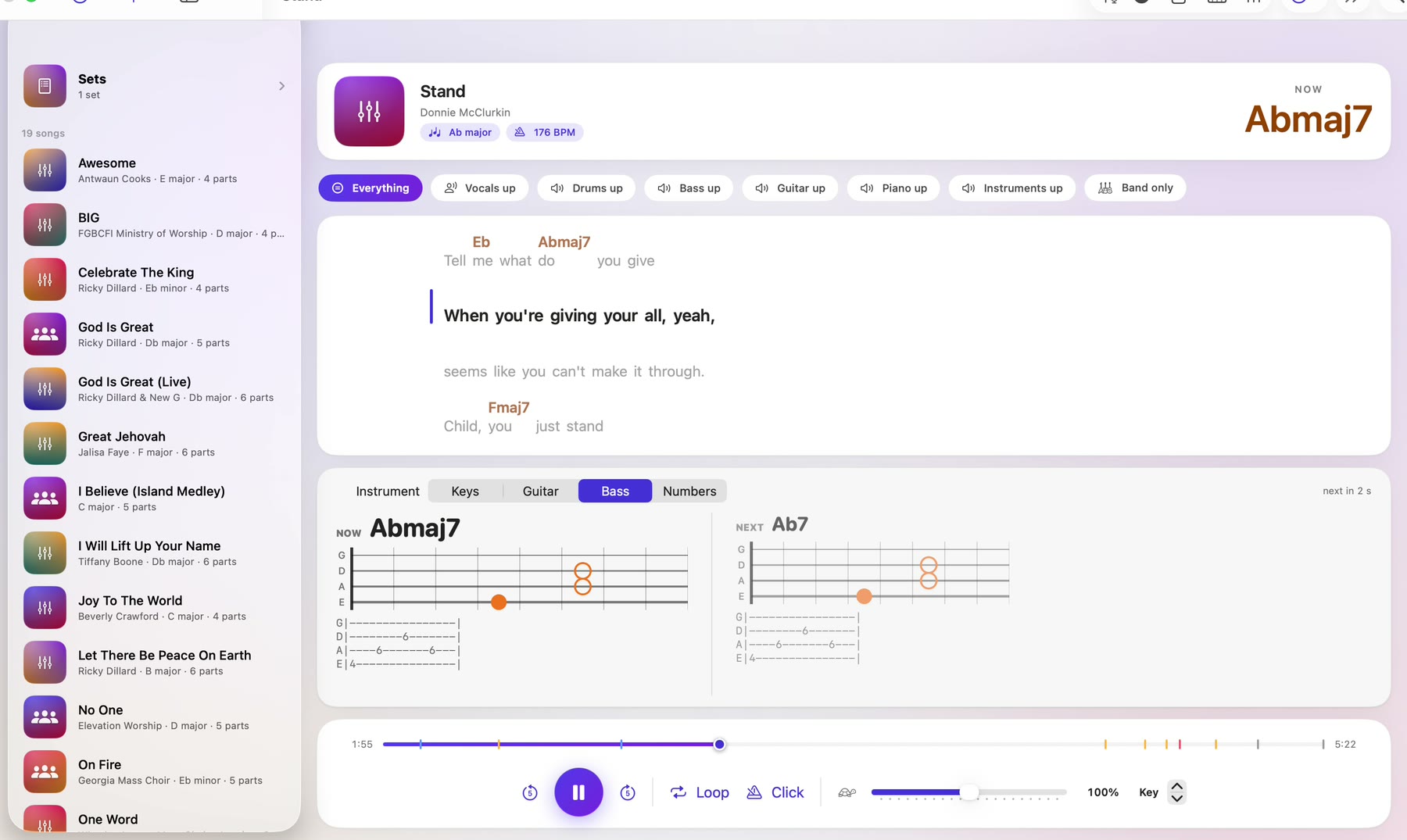
The chord chart is worked out from the audio on your device and laid over the words. See the chord you're on and the one coming next as a keyboard voicing, a guitar shape or a bass note.
- Keyboard voicings that move smoothly from chord to chord
- Guitar shapes, with barre shapes up the neck
- Bass notes with tab
Run the service from one screen.
Put the service in order, set each song's key, and step through the whole set on the Live screen. Share it, and everyone in the room follows along on their own device and gets your cues.
- Section pads jump to the next chorus or the vamp
- Cues: Vamp, Again, Go up, Down, Build, Hold, Out, or anything you type
- Song Prep: fix the words, name the sections, tap along to time each line
- Split a song into soprano, alto, tenor, bass and band with your own MVSep account


Sing your part. See how it went.
Pick your part and it drops out of the mix. Record, sing along, and your voice draws a line over the part as you go: green on the note, amber close, rose off.
- How much was on the note, and whether you ran sharp or flat, ahead or behind
- A score for every line; tap one to loop it
- Hear your take with the choir, next to the real part, or on its own


The words written. Every device ready.
Split a song into parts and the app writes its lyrics from the voices, every word timed to the music. If published lyrics match what it heard, it uses those words. Pick Quick, built into your device, or Best Quality for a more careful listen.
- Lyrics heard on your device; only the title and artist are looked up
- Pair devices with a six-digit code, Android included
- Turn on iCloud and your Apple devices stay in step anywhere


Everyone follows, whatever phone they carry.
Choir members and band players on Android get the songs their director prepared, with the same practice tools, and follow the Live screen on the same Wi-Fi, cues and all.


Watch the tutorials.
Lead from Apple devices. Follow from anything.
Directors prepare songs and lead on iPhone, iPad or Mac. Members practice and follow on any of them, Android included.
| Feature | iPhone & iPad | Mac | Android |
|---|---|---|---|
| Tempo and key, loops, speed trainer | ✓ | ✓ | ✓ |
| Part mixes: your part up front | ✓ | ✓ | ✓ |
| Lyrics with chords over the words | ✓ | ✓ | ✓ |
| Follow a Live screen with cues | ✓ | ✓ | ✓ |
| Lead a Live screen and send cues | ✓ | ✓ | — |
| Sets with a key per song | ✓ | ✓ | — |
| Chord shapes for keys, guitar and bass | ✓ | ✓ | — |
| Read the chords from the audio | ✓ | ✓ | — |
| Split into choir parts (MVSep) | ✓ | ✓ | — |
| Song Prep: words, sections, timing | ✓ | ✓ | — |
| Sing your part and see your notes | ✓ | ✓ | — |
| Write lyrics from the voices | ✓ | ✓ | — |
| Chords as Nashville numbers | ✓ | ✓ | — |
| Add a song from a file link | ✓ | ✓ | ✓ |
| Add a song from a YouTube link | — | ✓ | — |
| Sync your devices over Wi-Fi | ✓ | ✓ | ✓ |
| Sync your devices with iCloud | ✓ | ✓ | — |
Good to know.
How much does it cost?
Learn The Part is free to try with up to three songs. Learn The Part Pro, a yearly subscription, unlocks unlimited songs. Pricing is set at launch.
Where do my songs come from?
Add any song file you have, paste a link from Dropbox, Google Drive or iCloud Drive, or open a song your director sends you. A director's song arrives with its parts, lyrics and chords, ready to practice.
Do I need an account?
No. There's no sign-up, and your songs stay on your devices. If you want them on all your Apple devices anywhere, you can turn on sync through your own iCloud.
Does following the Live screen need the internet?
No. iPhones, iPads and Macs connect directly to each other. Android phones follow over the room's Wi-Fi. Everyone needs the leader's four-digit code.
More answers on the support page.
Learn your part. Lead the room.
Coming soon to the App Store and Google Play.